
Why Orca ADE Runs Most of My Work (and My IDE Still Has a Job)
My IDE is no longer where most of my work happens
A year ago, my day started by opening my IDE. Today it starts by opening Orca, an Agent Development Environment, and handing out work to a handful of coding agents.
My IDE hasn't disappeared. But it has moved from the centre of my workflow to a specialist tool I reach for when I need it. This post explains why, and what that split looks like in practice.
What Orca actually is
Orca is a free, open-source desktop app from Stably AI, MIT-licensed and backed by Y Combinator. It runs on macOS, Windows and Linux, with a companion app for iOS and Android.
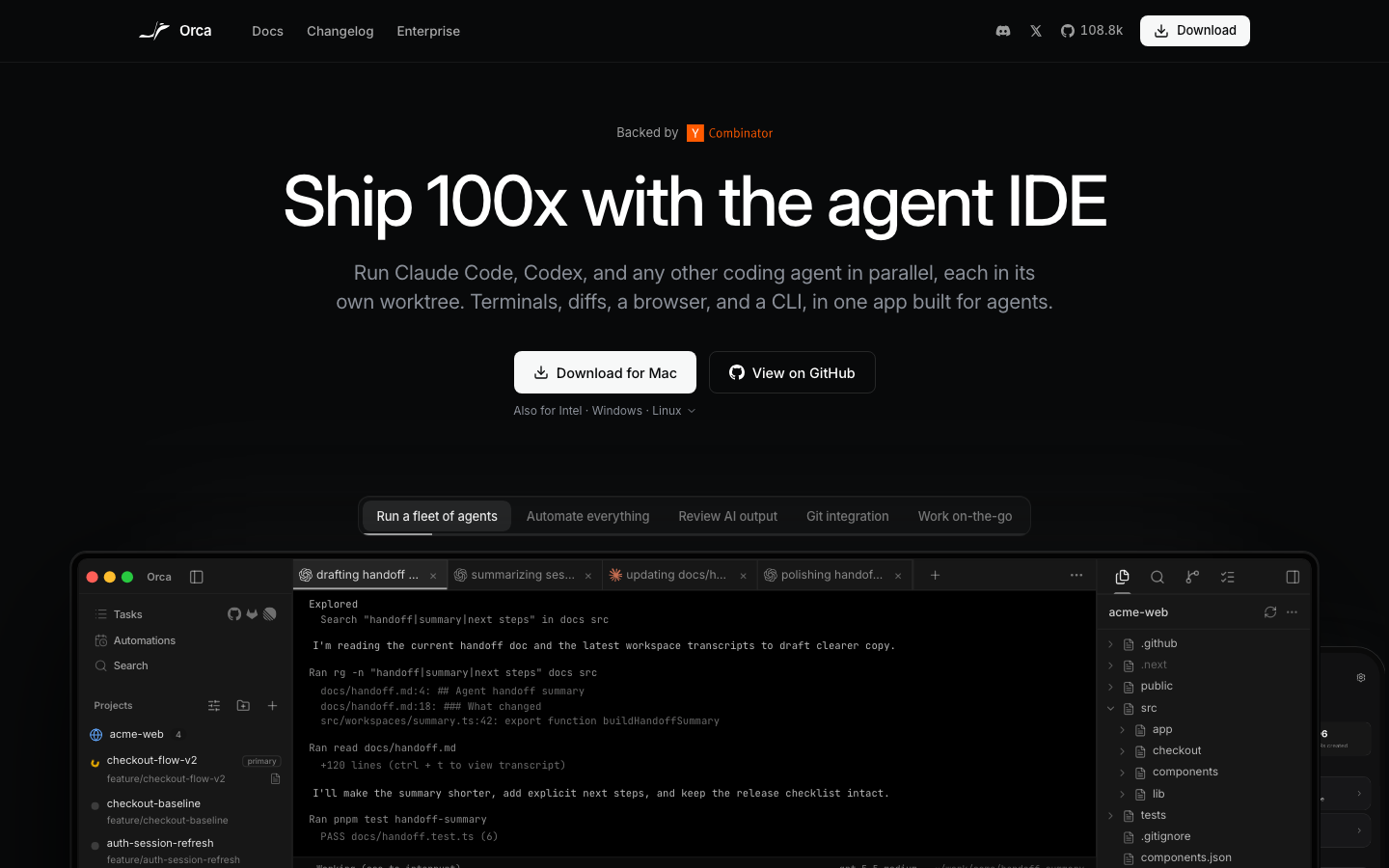
The key idea is in the name. An IDE is built for one person typing code. An ADE is built for a person directing several agents that write the code. Orca doesn't ship its own model: you bring the agents and subscriptions you already have, such as Claude Code, Codex, Gemini, Cursor CLI or OpenCode.
The features that matter most to me:
- Isolated worktrees. Every task gets its own git worktree, so agents never trip over each other's changes. No stashing, no branch juggling.
- Parallel agents. I can send one prompt to several agents, compare the results and merge the best one.
- Built-in review. Diffs, inline comments that go straight back to the agent, CI status and PRs, all in one place.
- Browser with Design Mode. Click a UI element and its HTML, CSS and a screenshot go into the agent's prompt.
- Mobile companion. I get a notification when an agent finishes and can send a follow-up from my phone.
How Orca runs the bulk of my day
Roughly 80% of my development work now starts and ends in Orca. A typical day looks like this:
- Plan the work as tasks. I break the day into small, clear tasks: a bug fix, a refactor, a new endpoint, a round of tests. Each one gets its own worktree.
- Hand tasks to agents. I start Claude Code on each worktree with a focused prompt. For tricky problems I give the same prompt to two agents and compare.
- Do something else while they work. This is the real shift. Instead of watching one agent type, I write specs, answer messages or think about architecture. My phone tells me when an agent is done.
- Review, don't rewrite. I read the diff, leave comments on specific lines and send them back. The agent fixes them in the same worktree.
- Merge what's good. Once tests pass and the diff makes sense, I open the PR from Orca and move on.
The gain isn't that agents type faster than me. It's that I can keep four or five streams of work moving at once, without them getting tangled.
Where my IDE still earns its place
I still keep JetBrains IntelliJ open next to Orca. It's where I go when I need to think closely about code rather than direct it:
- Deep debugging. Breakpoints, stepping through code and inspecting state are still faster in a full IDE.
- Hard design decisions. When the shape of a module isn't clear yet, I sketch it myself before handing it to an agent.
- Learning a new codebase. Navigating, jumping to definitions and reading is how I build my own understanding.
The rule I've settled on: if I can describe the outcome clearly, it goes to Orca. If I still need to figure out what the outcome should be, I open my IDE.
What I've learned along the way
- Review is the new bottleneck. Running five agents is easy. Reviewing five diffs well is not. I limit parallel tasks to what I can properly check.
- Small tasks win. One clear goal per worktree gives far better results than one big, vague prompt.
- Tests are your safety net. Agents work best in a repo with good test coverage, because they can check their own work.
- Watch the hidden cost. Orca is free, but the agents run on your own subscriptions. Running many in parallel burns through usage limits faster. Orca's usage tracking helps here.
- Start with two, not ten. Get comfortable reviewing two agents in parallel before you scale up.
From writing code to directing it
The biggest change isn't a tool. It's my role. I spend less time typing code and more time defining work, reviewing results and making decisions. Orca is built for that role; my IDE is built for the moments I still want to write every line myself.
If you already use Claude Code, Codex or another CLI agent, Orca is worth an afternoon. It's free and open source, so there are no licence fees, although the AI services you use may still cost money. You can find it at onorca.dev and on GitHub.
How are you splitting work between agents and your IDE? I'd love to hear what's working for you: let me know on LinkedIn.